
A shared calendar app, with memo and to-do lists and a chat for each calendar.
As of October 2026
InVenn vs TimeTree
TimeTree is a popular app for sharing a calendar with a family, a couple or a group. InVenn is a family organizer: the shared calendar, plus the chores, routines, lists, notes and meals that go with it, and a screen for the kitchen. They overlap on the calendar and differ on almost everything else, and this page lays it out fairly.
The short version
Choose TimeTree if
you want a light shared calendar for a group, such as a family, a couple or a club, with several shared calendars you can switch between, and a free plan you can live with.
Choose InVenn if
you want one app for the family's whole week: calendar, chores with stars, routines, lists, notes and meals, with no ads, and a tablet that shows it all in the kitchen.
Side by side
| Feature | TimeTree | InVennFree plan |
|---|---|---|
| The basics | ||
| What it is | A family organizer: calendar, to-dos and chores, lists, notes, meals and a family tablet. | |
| Price | Free with adsPremium $4.49 a monthor $44.99 a yearPremium is $4.49 a month or $44.99 a year (first month free), per account, with no family plan. It removes ads and adds file attachments, a vertical view of up to three days, event priority and pinning, and dedicated support. | Free planOptional Plus laterFree plan today, with no ads. An optional Plus is coming later; its price has not been announced. |
| No screen to buy | ✓ Nothing to buy. Any phone, tablet or PC with the app or the web version. | ✓ Nothing to buy. Any tablet, laptop, PC or phone. |
| No ads | ◐ Ads on the free plan; ad-free is Premium ($4.49 a month). | ✓ None, and no tracking. |
| Where it runs | ✓ iOS and Android apps, Apple Watch and widgets, and a web version for PCs. No desktop app found. | ◐ The browser of any device, installed to the Home Screen. Not in the app stores yet. |
| Synced devices | ✓ The same account works on several devices; no device cap found. No member limit found; Premium is per account. | ◐ Free plan: up to 3 devices. Plus, later: up to 10. |
| Calendar and family | ||
| Shared calendar | ✓ Invite by link (valid 7 days), a color per member, and several calendars with filters. "Virtual members" for children, pets or cars need no account, up to 5 per calendar. No official member maximum found. | ✓ A color for each person, a week with hours on every day, and Google Calendar both ways. |
| Other calendars | ◐ Import is one way: events come in but do not sync back to other calendars. | ✓ Google Calendar both ways. Outlook calendars and calendar links come in. |
| Kid and parent modeskids' own view, a parent's PIN | ✗ No kids' view or parent PIN found. Virtual members (up to 5 per calendar) stand in for children without accounts. | ✓ Kids get their own simple view. A parent's PIN guards parent mode, and a parent OKs chores and rewards. |
| Work and school apart from home | ✓ Separate calendars per group; events in a private calendar are not seen by others. | ✓ A Private | Work switch keeps work off the family tablet and other phones. Kids get a School list. |
| Requestsa kid asks, a parent accepts | ✗ No request-and-accept flow. Calendar Chat lets members talk around events. | ✓ A kid sends a request in the family mailbox; a parent accepts or declines, and can turn it into a to-do. |
| Chores, lists and notes | ||
| Chores and rewards | ✗ None found. | ✓ Chores, stars, a rewards store and a parent's OK. |
| Recurring bills and weekly jobswith fresh ticks | ◐ Repeating events; a to-do list can attach to an event, but fresh ticks per repeat are not described. | ✓ Repeating checklists for weekly jobs: each period keeps its own ticks, with a history. Bills live in Budget. |
| Deadlines that can't slip | ◐ No deadline or overdue feature found. Premium has event priority and pinning. | ✓ A Deadline switch gives a date a warm glow everywhere. An overdue one turns red and never slides. |
| Lists | ✓ Memo: simple memo, shopping list, places list and to-do list. A to-do list can attach to an event with a progress count. | ✓ Tables with columns, sections and dates that can repeat and show on the calendar. |
| Notes | ◐ Memos only (text lists); no notebook editor. | ✓ A real editor and notebooks with sections, shared the way you choose. Two people can write at once. |
| Meals | ✗ None found. | ✓ Dinner plan, recipes, a grocery list. |
| Voice, offline and your data | ||
| Voice and AI adding | ✗ No voice or AI adding found. | ✓ Voice adding that you check before it's saved (free for now). The AI Assistant, a character that reads and changes your plans with your OK, is in private testing and will come to all families later, with a free trial and then paid. |
| Works offline | ✓ Add and edit events offline; others see them when you reconnect. Comments written offline do not sync. | ✓ The app opens and works offline; changes sync when the device is back online. |
| Your databackup, download, privacy | ✗ "You can't export events from TimeTree." Its privacy policy allows profiling for ads and lists about 30 ad networks. | ✓ Download a full backup any time; daily backups on the server. No ads and no tracking. |
Checked October 2026 on TimeTree's own pages and its help center (listed below). TimeTree's prices vary by region and currency, and the ones here are in US dollars.
Sources, checked October 2026
- TimeTree Premium: $4.49 a month, $44.99 a year, first month free, and what Premium adds
- TimeTree Help, what is TimeTree Premium?: no ads, prices in other currencies, per account
- TimeTree Help, how much does TimeTree cost?: what is free
- TimeTree Help, Memo: memo, shopping list, places list, to-do list
- TimeTree Help, to-do lists: a to-do list on an event
- TimeTree news, Calendar Chat: a chat for each calendar
- TimeTree news, virtual members: children, pets and cars without accounts, up to 5
- TimeTree Help, sharing a calendar: invite links and colors
- TimeTree Help, private calendars: what others cannot see
- TimeTree Help, repeating events: repeats and editing one occurrence
- TimeTree Help, using TimeTree offline: what syncs after you reconnect
- TimeTree Help, exporting events: "You can't export events from TimeTree"
- TimeTree privacy policy: profiling for ads and ad networks
- App Store, TimeTree: ratings and the privacy label
- Google Play, TimeTree: downloads and ads
Where InVenn is behind
TimeTree is simpler to start. Inviting people takes a link, and TimeTree has widgets, an Apple Watch app and a web version for a PC, with real iPhone and Android apps (more than 10 million downloads on Google Play, and 4.9 stars from about 93,000 ratings on the App Store). InVenn is a browser app and is not in the app stores yet.
TimeTree also has "virtual members" for children, pets or cars that need no account, up to 5 per calendar, which suits a little kid who has no phone; InVenn gives each person a color and a place in the row of people, but not a stand-in without a profile. A chat for each calendar lets members talk around events, where InVenn has the family mailbox. And TimeTree is a calmer, simpler app that has been around longer, while InVenn is new and still being built.
What TimeTree does best
TimeTree keeps its promise simply: you create a calendar, send an invite and you are done. Groups can keep several shared calendars, one for the family, one for the soccer team, one for school, and use filters to see them all together or one at a time. Photos can be posted in an event's comments even on the free plan, and attaching files such as PDFs is a Premium feature. It also has memo and to-do lists, a chat for each calendar, and virtual members for kids and pets who have no account. If a shared calendar and a little conversation around it is what you need, it is a clean, focused app.
Where InVenn goes further
The chores and the kids. Chores earn stars, stars buy rewards from your family's own store, and a parent OKs each one. Routines walk a young child through the morning one big step at a time. A kid has their own phone view and ticks chores on the family tablet with one big green button.
The rest of the household. Lists are tables with columns and sections, and a date in a list can repeat and show on the calendar. Notes sit in notebooks with sections and sharing you control. There is a meal plan, recipes from a link and a grocery list sorted by aisle, and deadlines glow until they are done.
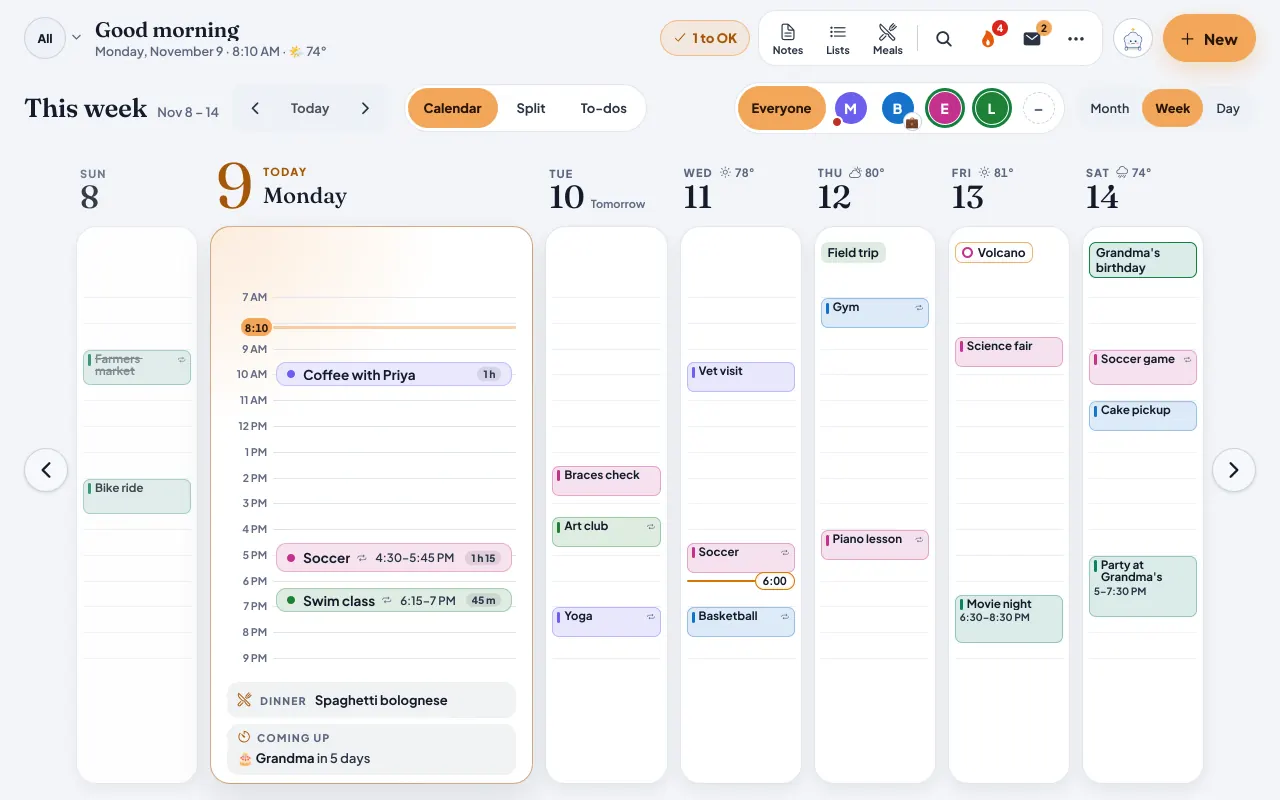
A calendar that shows the day. Today is a big card with a real timeline and a line for now, and every day of the week has its hours on one shared scale, with Calendar, Split and To-dos one tap apart. See how the calendar works.
No ads. InVenn has none, and no tracking, on the screen your kids use. The honest costs: it installs from the browser rather than an app store for now, and some features are still being finished.
We are not affiliated with TimeTree. Product names belong to their owners. Spotted something out of date? Tell us and we will fix it.
Questions
Good to know
Is TimeTree free?
TimeTree says basic functions are free, including creating and sharing calendars. Premium costs $4.49 a month or $44.99 a year as of October 2026, with the first month free, and adds file attachments, a vertical view of up to three days, event priority and pinning, dedicated support and an ad-free experience.
Does TimeTree show ads?
TimeTree lists "No ads" as a Premium feature, which means the free plan has ads. InVenn has no ads and no tracking, and it has a free plan.
Is InVenn a TimeTree alternative?
For families who want more than a shared calendar, yes: InVenn adds chores with stars and a parent's OK, routines, lists, notes, meals and a family tablet. If you only want a calendar your group shares and chats around, TimeTree is built for exactly that.
Does TimeTree have chores and rewards?
We found no chores or rewards feature on TimeTree's own pages. InVenn has chores, stars, a rewards store and a parent's OK.
Does TimeTree have lists and notes?
Yes, a little. TimeTree has Memo for simple memos, shopping lists, places lists and to-do lists, and a to-do list can attach to an event. It has no notebook editor, and it has a chat for each calendar. InVenn has lists as tables and notes in notebooks you share the way you choose.
Get the app
Get your family's code
Free, and no waiting. Type your name and email: your code appears right away, with step-by-step instructions for every phone, tablet and computer. We email them to you too.
One code per family. We use your email only to send your code and instructions. Privacy policy