Google's calendar, with Tasks, Keep for notes and a family group of up to 6.
As of October 2026
InVenn vs Google Calendar for families
Google Calendar is the calendar most of us already use, and sharing it with the family works well. InVenn is built for the rest of family life around the calendar: who does which chore, what is on the list, what the babysitter should know. This page lays out the difference fairly, and the good news is that you can use both.
The short version
Stay with Google Calendar if
all you need is a shared calendar, everyone in the family already has a Google Account, and you handle chores and lists some other way you are happy with.
Add InVenn if
you want chores with stars and a parent's OK, routines, lists, notes and meals in the same place as the calendar, plus a screen for the kitchen. InVenn keeps your Google Calendar in sync, both ways.
Side by side
| Feature | Google Calendar | InVennFree plan |
|---|---|---|
| The basics | ||
| What it is | A family organizer: calendar, to-dos and chores, lists, notes, meals and a family tablet. | |
| Price | FreeOptional storage from $1.99 a monthCalendar, Tasks and Keep are free with a Google Account, which includes 15 GB of storage. Optional Google One plans are for storage and AI, not Calendar: $1.99 a month (100 GB), $9.99 for Google AI Plus (2 TB) and $19.99 for Google AI Pro (5 TB), each shareable with up to five others. Calendar itself has no paid tier for families. | Free planOptional Plus laterFree plan today, with no ads. An optional Plus is coming later; its price has not been announced. |
| No screen to buy | ✓ Nothing to buy: any browser works as a kitchen screen. Nest displays (sold separately) show daily and weekly views and take voice commands. | ✓ Nothing to buy. Any tablet, laptop, PC or phone. |
| No ads | ◐ No ads in the app, and Google says Calendar content is not used for ads. Its App Store label lists identifiers used for advertising. | ✓ None, and no tracking. |
| Where it runs | ✓ Web (Chrome, Firefox, Safari, Edge), Android phones and tablets, iPhone and iPad, Wear OS and Apple Watch. There is no Windows or Mac desktop app; it works in any PC browser. | ◐ The browser of any device, installed to the Home Screen. Not in the app stores yet. |
| Synced devices | ✓ No device limit found. A Family group is 6 people; Google One storage can be shared with 5 others. | ◐ Free plan: up to 3 devices. Plus, later: up to 10. |
| Calendar and family | ||
| Shared calendar | ✓ Share with specific people or a Google group in five levels, from "See only free/busy" to "Make changes and manage sharing"; no maximum number found. A Family calendar comes with a family group, which is capped at 6 people, and sharing it with non-family members can only be done from a computer. | ✓ A color for each person, a week with hours on every day, and Google Calendar both ways. |
| Other calendars | ✓ Its own, plus the ones you add. | ✓ Google Calendar both ways. Outlook calendars and calendar links come in. |
| Kid and parent modeskids' own view, a parent's PIN | ◐ Family Link: accounts for under-13s with app limits, screen time and location (Android and Chromebook, not iPhone or Windows). No kids' view or PIN in Calendar. | ✓ Kids get their own simple view. A parent's PIN guards parent mode, and a parent OKs chores and rewards. |
| Work and school apart from home | ◐ Several calendars, each shown or hidden, with working hours and location. No one switch that hides work from the family. | ✓ A Private | Work switch keeps work off the family tablet and other phones. Kids get a School list. |
| Requestsa kid asks, a parent accepts | ✗ None found. Family Link approval covers Google Play purchases only. | ✓ A kid sends a request in the family mailbox; a parent accepts or declines, and can turn it into a to-do. |
| Chores, lists and notes | ||
| Chores and rewards | ✗ No chores or rewards feature found. Family Link is about screen time and apps. | ✓ Chores, stars, a rewards store and a parent's OK. |
| Recurring bills and weekly jobswith fresh ticks | ◐ Repeating tasks: finish one and the next appears. A task with subtasks can't repeat, so there is no repeating checklist. | ✓ Repeating checklists for weekly jobs: each period keeps its own ticks, with a history. Bills live in Budget. |
| Deadlines that can't slip | ◐ Tasks have deadlines, and Calendar lets you review unfinished ones from the past 365 days. No marker for a date that cannot slip. | ✓ A Deadline switch gives a date a warm glow everywhere. An overdue one turns red and never slides. |
| Lists | ◐ Google Tasks: lists, subtasks and due dates, shown in Calendar. Shared task lists are not described. | ✓ Tables with columns, sections and dates that can repeat and show on the calendar. |
| Notes | ✓ Google Keep: notes, lists, images, drawings and audio, shared with collaborators. A separate app, not in the calendar. | ✓ A real editor and notebooks with sections, shared the way you choose. Two people can write at once. |
| Meals | ✗ No meal planner found. | ✓ Dinner plan, recipes, a grocery list. |
| Voice, offline and your data | ||
| Voice and AI adding | ✓ Gemini creates and edits events by voice or text, with some set-up. "Hey Google" adds events on Nest displays. | ✓ Voice adding that you check before it's saved (free for now). The AI Assistant, a character that reads and changes your plans with your OK, is in private testing and will come to all families later, with a free trial and then paid. |
| Works offline | ◐ On a computer, offline only in Chrome and view only. The phone apps keep entries on the device. | ✓ The app opens and works offline; changes sync when the device is back online. |
| Your databackup, download, privacy | ◐ Export all calendars as .ics from a computer ("You can't export from the Google Calendar app"), or use Download Your Data. Content is private unless shared and encrypted in transit and at rest. Google's Play Store data-safety label lists location, personal info and other types of data collected. | ✓ Download a full backup any time; daily backups on the server. No ads and no tracking. |
Checked October 2026 on Google's own help pages and its Google One page (listed below). Google changes its products often, so check before you decide.
Sources, checked October 2026
- Google Calendar Help, share your calendar: the five permission levels
- Google Calendar Help, the Family calendar: made with a family group; sharing it outside the family from a computer
- Google Families Help, the family group: up to 6 people, one family manager
- Google Calendar Help, tasks in Calendar: due dates, lists and reviewing unfinished tasks
- Google Calendar Help, repeating tasks: what can and cannot repeat
- Google Tasks Help: lists, subtasks and due dates
- Google Keep Help: notes, lists, images, drawings and audio
- Google Families Help, Family Link: what parents can control, and on which devices
- Gemini Apps Help, Gemini and Calendar: events by voice or text
- Google Nest Help, calendars on Nest displays: day and week views, voice commands
- Google One plans: storage and AI plans, shared with up to five others
- Google Calendar Help, export your calendars: .ics from a computer
- Google Calendar Help, privacy and your data: who sees your entries and how they are stored
- Google Calendar product page: the web, Android, iPhone, iPad and watches
- Google Calendar on the App Store: the privacy label
Where InVenn is behind
Google Calendar is the better pick on several counts. It is everywhere: the web, Android phones and tablets, iPhone and iPad, Wear OS and Apple Watch, and Nest displays in the kitchen that answer to "Hey Google". InVenn is a browser app that you install to the Home Screen, and it is not in the app stores yet.
Google's sharing is finer: five permission levels, from seeing only free or busy up to managing sharing. Its voice and AI help (Gemini, and the assistant on Nest displays) is built into the phone and the home, while InVenn's voice adding lives inside the app. Google Keep is a mature notes app, and Google Family Link manages kids' devices, with screen time, app limits and location, which InVenn does not do. And far more people use Google Calendar than InVenn: InVenn is new, still being built, and a few features change.
What Google Calendar does best
Google Calendar is fast, familiar and everywhere. Sharing is fine-grained: you can let a grandparent see only when you are busy, give a partner full control, and share with a Google group. It has Tasks built in, with lists, due dates and repeats, and Keep for notes. It works on the web, Android, iPhone and iPad, Wear OS and Apple Watch, with Nest displays that take voice commands in the kitchen, and it is free with a Google Account. If your family already lives in Google Calendar, nothing here asks you to leave it.
What InVenn adds around it
A calendar tells you what is happening. A family also needs to know who does what, and whether it got done. InVenn adds chores that earn stars for a rewards store your family designs, with a parent's OK on each one, and routines for mornings and bedtimes with one big step at a time. It adds lists with columns and sections, notes in notebooks you share the way you choose, a meal plan with a grocery list, and deadlines that glow that stay visible until they are done.
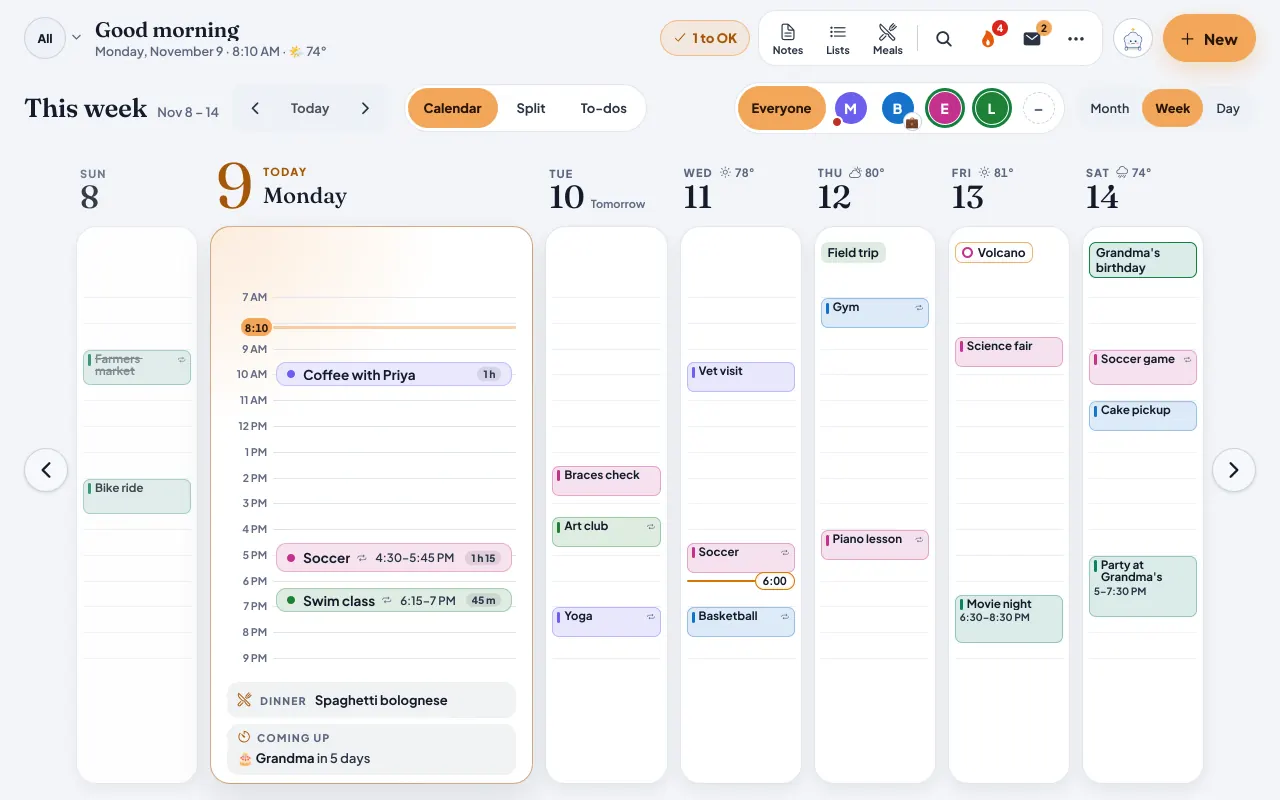
The calendar itself is different too. Today is a big card with a real timeline and a line for now, and every day of the week has its hours on one shared scale, in a color for each person, so a clash between two parents and a soccer practice shows up as a clash. Pick Calendar, Split or To-dos with one tap. See how the calendar works.
Using both
Connect Google Calendar to InVenn and it works both ways: events you make for yourself in InVenn go into your own Google Calendar, and changes you make there come back. That means you can keep Google Calendar for work and for the people who will never leave it, and let the family tablet in the kitchen show the family's week. Work things can stay on your own devices behind the Private | Work switch. More about Work and school mode.
What InVenn asks of you: it installs from the browser rather than an app store for now, and a few features are still being finished. What it costs: nothing on the free plan, and the price of the optional Plus, coming later, will be announced before anyone is asked to pay.
We are not affiliated with Google. Google Calendar is a product of Google LLC, and product names belong to their owners. Spotted something out of date? Tell us and we will fix it.
Questions
Good to know
Is InVenn a Google Calendar alternative?
It can be, but you do not have to choose. InVenn connects to Google Calendar both ways, so you can keep Google Calendar for work and let InVenn be the family's home for chores, lists, notes and the kitchen tablet.
Can I share a Google Calendar with my family?
Yes. Google lets you share a calendar with specific people and choose what each person can do, from seeing only free or busy up to making changes and managing sharing. Google also creates a family calendar when you set up a family group.
Does Google Calendar have chores and rewards?
We found no chores or rewards feature in Google Calendar's help pages. Google Tasks adds to-dos with due dates, lists and repeating tasks. InVenn adds stars, a rewards store and a parent's OK.
Will InVenn replace Google Calendar for work?
No, and it is not meant to. Work things can live in your Google Calendar, and InVenn can bring them in. If you want them out of the family's way, the Private | Work switch keeps them on your own devices.
Is Google Calendar really free?
Yes for Calendar, Tasks and Keep: they need only a Google Account, which includes 15 GB of storage. Google One plans, from $1.99 a month as of October 2026, are for storage and AI, not Calendar. A Family group is free and is capped at 6 people.
Get the app
Get your family's code
Free, and no waiting. Type your name and email: your code appears right away, with step-by-step instructions for every phone, tablet and computer. We email them to you too.
One code per family. We use your email only to send your code and instructions. Privacy policy