
InVenn vs Skylight Calendar
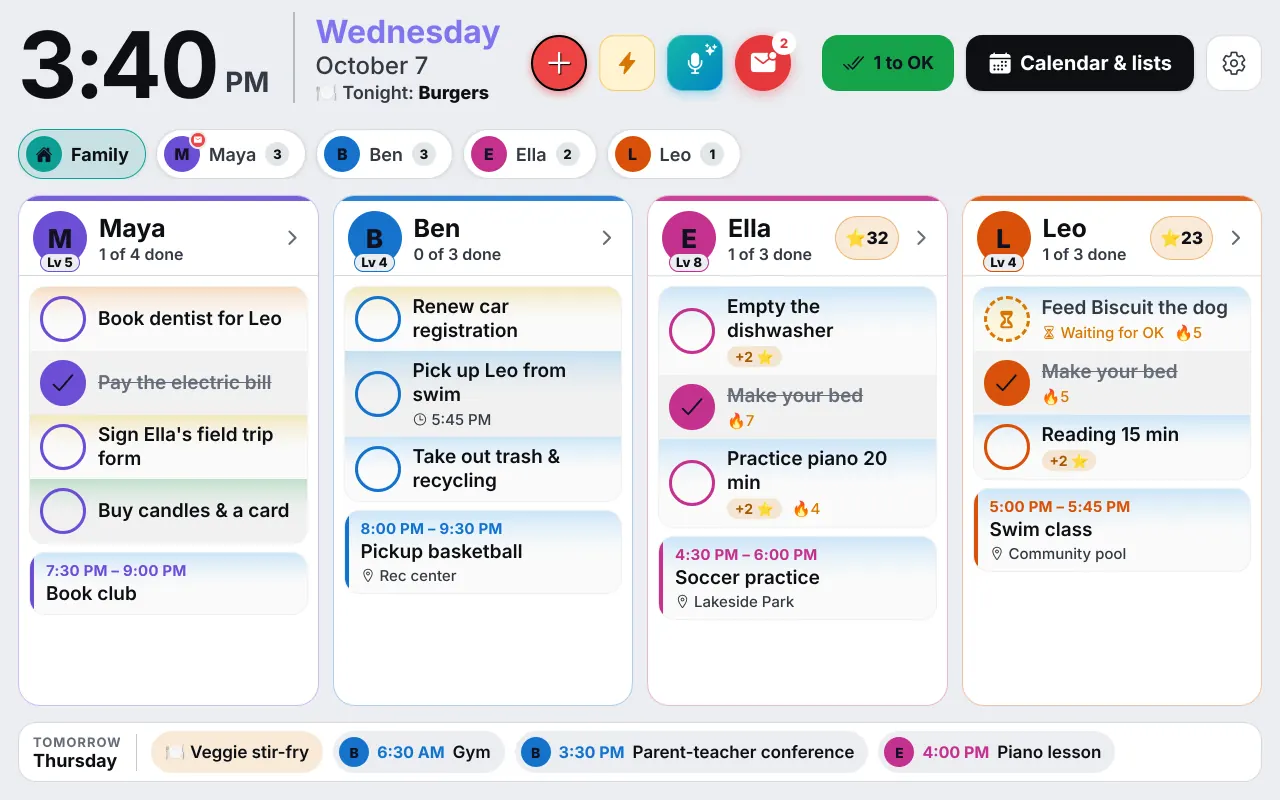
Skylight is a good product: a touchscreen you hang on the wall, with an app. InVenn is a family organizer that runs on a tablet you already own. They solve the same problem with different trade-offs, and this page lays them out fairly.
The short version
Choose Skylight if
you want one finished device that arrives in a box, with a screen made for the wall, and you don't mind paying for the hardware and, for some features, a yearly plan.
Choose InVenn if
you have a spare tablet, would rather not buy a screen, and want chores, routines, meals, notes and deadlines in one free-in-the-beta app, in English and Russian.
Side by side
Prices are US list prices read from Skylight's own pages and help center in October 2026. They change, so check before you buy.
| Skylight Calendar | InVenn | |
|---|---|---|
| The screen | Its own touchscreen. 10-inch $169.99, 15-inch $299.99; a 27-inch Max costs more. | None to buy. Any tablet, phone or computer with a browser. |
| Yearly plan | Calendar Plus, $79 a year (first month free): photo screensaver, meal planning, Magic Import, Rewards. | Free during the beta. Pricing after the beta has not been announced. |
| Google and Apple calendars | Google and iCloud both ways. Outlook, Yahoo and Cozi one way. | Google both ways. Outlook calendars and calendar links come in. |
| Chores and stars | Tasks manager is free. Rewards, which stars are spent on, need Calendar Plus. | Chores, stars, a rewards store and a parent's OK, all included in the beta. |
| Routines | Routines that repeat daily or weekly at set times. | Routines with big pictures, optional timers and stars. |
| Meals | Meal planning in Calendar Plus. | Dinner plan, recipes from a link, Cook mode and a grocery list by aisle. |
| Returns and warranty | Buy on myskylight.com and return it for a full refund within 4 months. If a covered issue shows up in the first 3 years, Skylight replaces the device free of charge (the "Skylight Promise"). | Nothing to return: it runs on a tablet you own. Free during the beta. |
| On your phone | iOS and Android apps. | A browser app that installs to the Home Screen. Not in the app stores yet. |
What each costs
A Skylight 15-inch Calendar lists at $299.99 and the 10-inch at $169.99. Skylight says the calendar, colour coding, Tasks manager and mobile app are free, and Calendar Plus adds a photo screensaver, meal planning, Magic Import and Rewards for $79 a year. The larger screen plus a year of Plus comes to about $379.
InVenn costs nothing during the beta, and you use a tablet that was going to sit in a drawer. After the beta there will be plans for sync and for AI, and we will say what they cost before anyone is asked to pay. If you have no spare tablet, buying one is a real cost, and you should count it.
Chores, rewards and routines
Both have the idea that kids work toward something. In Skylight, completing a task earns stars, and rewards are created in the Skylight app and need Calendar Plus. Star values are set in the app, not on the wall display. In InVenn, chores, stars, the rewards store and the optional allowance are included, and a parent can OK each finished chore and each reward. See the chore chart app and kids' routines.
Where Skylight is the better fit
A dedicated display is a known quantity: it arrives set up, it has a screen designed for the wall, and it does one job. Skylight has iOS and Android apps. If your family will not fiddle with a tablet, stand and charger, buying the finished product is a reasonable choice.
InVenn asks for a little more work at the start. You prop a tablet on a stand, join it with a code, and keep it plugged in. In return, you pay no hardware bill and the screen can be anything you own. Our guide to an old tablet as a family calendar walks through it.
Sources, read in October 2026
- Skylight, Skylight Calendar: prices, Calendar Plus, what is free, the 4-month refund and the 3-year Skylight Promise.
- Skylight Support, what Skylight Calendar syncs with: two-way and one-way calendars.
- Skylight Support, Create and Redeem Rewards: rewards need Calendar Plus.
- Skylight Support, Routines and Chores.
We are not affiliated with Skylight. Product names belong to their owners. Spotted something out of date? Tell us and we will fix it.
Questions
Good to know
Is InVenn a Skylight alternative?
For families who want a wall calendar without buying a screen, yes. InVenn runs on a tablet you already own. If you want one finished device that arrives in a box and just works, Skylight is built for exactly that.
Does Skylight need a subscription?
The Skylight Calendar works without one, and Skylight lists its Tasks manager, colour coding and mobile app as free. Calendar Plus costs $79 a year and adds a photo screensaver, meal planning, Magic Import and Rewards, as of October 2026.
Does InVenn sync with Google Calendar?
Yes, both ways. Skylight also syncs both ways with Google and Apple iCloud, and one way with Outlook.
How much will InVenn cost after the beta?
Pricing has not been announced. InVenn is free during the beta. The plans we are working on are described on the roadmap.
Get the app
Get your family's code
Free during the beta, and no waiting. Type your name and email: your code appears right away, with step-by-step instructions for every phone, tablet and computer. We email them to you too.
One code per family. We use your email only to send your code and instructions. Privacy policy