
A family organizer in the browser, with a family tablet mode.
As of October 2026
InVenn compared with the family calendar apps and screens
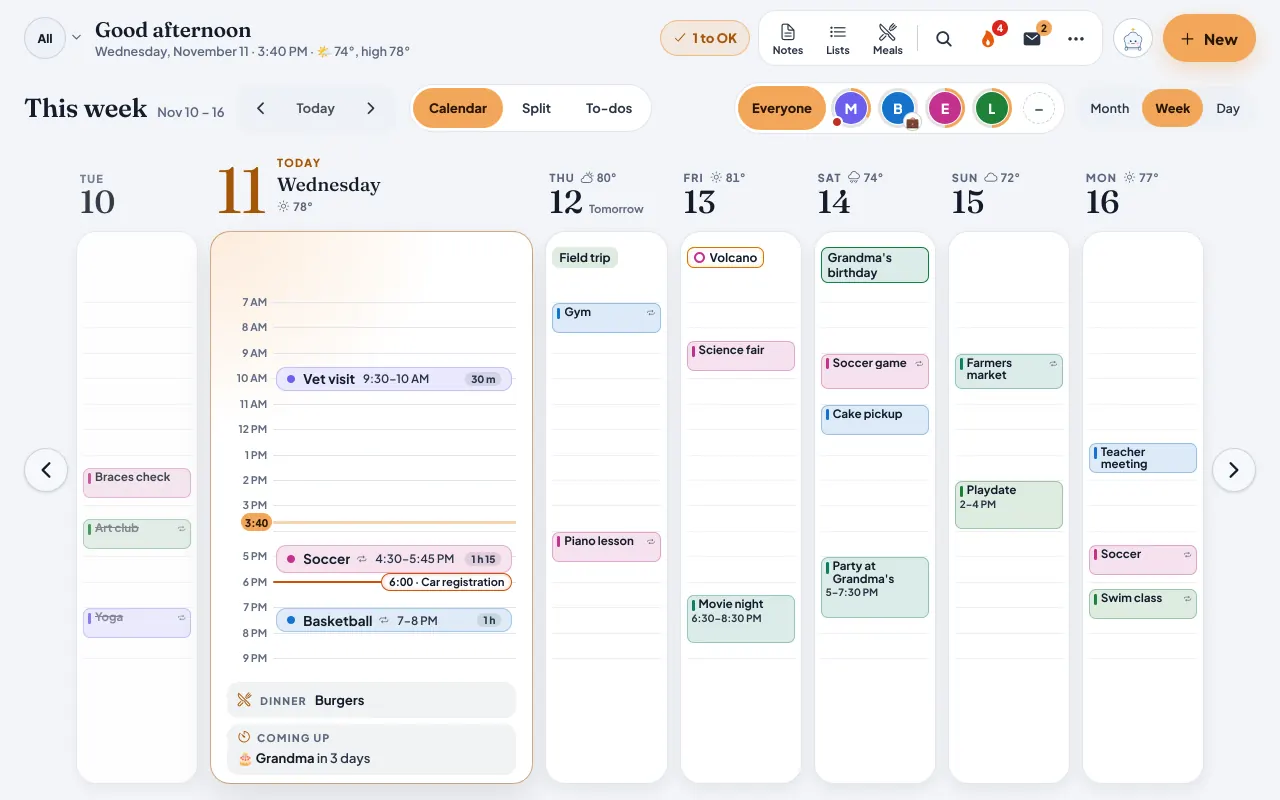
There are good ways to run a family's days: a shared calendar you already have, a free organizer app, or a screen for the wall that arrives in a box. Here is InVenn next to six of them, read from each product's own pages and checked in October 2026, with the places where the others are the better choice.
All seven, side by side
Checked October 2026
Every cell comes from the product's own pages. "No official information found" means we read those pages and found nothing, not that the feature cannot exist. A green tick always means good for a family, so a row such as "No ads" is worded to match. The rule for paid features: a tick means it comes with the free plan or with what you normally buy (the membership Hearth requires counts), and a half circle means it needs an optional paid upgrade, such as Skylight Plus, Cozi Max or TimeTree Premium, or is limited. On a phone, scroll sideways.
Yes, good for a family Partly No, or we found none No official information found
| Feature | InVennFree plan | Google Calendar | Apple Calendar | Cozi | Skylight Calendar | TimeTree | Hearth Display |
|---|---|---|---|---|---|---|---|
| The basics | |||||||
| What it is | Google's calendar, with Tasks, Keep and a family group of 6. | Calendar with Reminders, Notes and Family Sharing (up to 6). | A family organizer app: calendar, lists, recipes, chores. | A touchscreen wall calendar with a mobile app. | A shared calendar app with memos, to-dos and chat. | A 27-inch wall touchscreen built around routines and rewards. | |
| Price | Free planOptional Plus later | FreeOptional storage from $1.99 a monthCalendar, Tasks and Keep are free. | Free with Apple devicesiCloud+ from $0.99 a month5 GB of iCloud free; you need Apple hardware. | FreeGold $39 a yearMax $79 a year | Screens from $149.99 (10-inch)$289.99 (15-inch)$569.99 (27-inch)Plus $79 a year | Free with adsPremium $4.49 a monthor $44.99 a year | $699plus a membership of $9 a monthor $86.40 a year |
| No screen to buy | ✓ Nothing to buy. Any tablet, laptop, PC or phone. | ✓ Nothing to buy. Any browser works. | ◐ Nothing to buy if you own Apple devices. | ✓ Nothing to buy. App and web. | ✗ Its own screen to buy. | ✓ Nothing to buy. Phone, tablet or PC. | ✗ Its own screen to buy. |
| No ads | ✓ None, and no tracking. | ◐ No ads in the app; the store label lists ad use of identifiers. | ✓ No ads in Calendar or Reminders. | ◐ Ads on the free plan; Gold is ad-free. | ◐ No on-screen ads; the policy shares data for advertising. | ◐ Ads on the free plan; ad-free is Premium. | ◐ No ads described; the policy allows ad cookies. |
| Where it runs | ◐ Any browser, installed to the Home Screen. Not in the app stores yet. | ✓ Web, Android, iPhone, iPad and watches. No desktop app. | ◐ Apple devices. Windows via Outlook or iCloud.com; no Android app. | ✓ iPhone, Android and the web. | ✓ Its own screen plus a free app. | ✓ iOS, Android, Apple Watch, web. No desktop app. | ✓ Its Display, a companion app and a lighter web app. |
| Synced devices | ◐ Free: 3. Plus, later: 10. | ✓ No device limit found. Family group: 6 people. | ✓ No device cap listed. Family Sharing: 6 people. | ✓ Every member on every device; up to 12 people. | ✓ No cap on people or phones stated. | ✓ Several devices per account; no cap found. | ✓ Unlimited profiles. Display and phone caps: no official information. |
| Calendar and family | |||||||
| Shared calendar | ✓ A color per person, a week with hours, Google both ways. | ✓ Five sharing levels. A Family calendar with a family group. | ✓ Up to 100 people; a Family calendar with Family Sharing. | ✓ A color-coded family calendar with reminders. | ✓ On screen and in the app. Two-way sync with Google and iCloud. | ✓ Invite by link, a color per member, several calendars. | ✓ Hearth calendar plus Google, iCal and Outlook. |
| Kid and parent modeskids' own view, a parent's PIN | ✓ A kid's own view, a parent's PIN, a parent's OK. | ◐ Family Link manages kids' devices, not Calendar. | ◐ Child accounts and Screen Time for the device, not Calendar. | ✗ No restricted access: everyone has full access. | ✓ A 4-digit Parental Lock PIN. No parent approval step. | ✗ No kids' view or PIN. Virtual members for kids. | ✓ Kid profiles, a 4-digit Display Lock, adult approvals. |
| Work and school apart from home | ✓ A Private | Work switch, and a School list for kids. | ◐ Several calendars to show or hide; no one work switch. | ◐ Calendars can be shown or hidden one by one. | ◐ One color-coded calendar; outside calendars can be added. | ◐ A profile and color per person; no work mode. | ✓ Separate calendars; private ones stay private. | ◐ Calendars per family profile; no work mode. |
| Requestsa kid asks, a parent accepts | ✓ A kid asks in the mailbox; a parent accepts or declines. | ✗ None found; approval covers Play purchases only. | ✗ Ask to Buy covers purchases, not calendar plans. | ? No official information found. | ? No official information found. | ✗ No request flow. Calendar Chat for talking. | ◐ Reward requests that adults approve. |
| Chores, lists and notes | |||||||
| Chores and rewards | ✓ Chores, stars, a rewards store and a parent's OK. | ✗ No chores or rewards found. | ✗ No chores or rewards found. | ◐ Chores lists, daily or weekly. No stars or rewards described. | ◐ Chores free; Star Rewards need Plus. | ✗ None found. | ✓ To-dos, routines, Stars and Rewards. Membership. |
| Recurring bills and weekly jobswith fresh ticks | ✓ Repeating checklists; each period keeps its own ticks. | ◐ Repeating tasks, but not with subtasks. | ◐ Reminders repeat; fresh ticks not described. | ◐ Chores lists repeat; tick reset not described. | ✓ Chores repeat daily to monthly, each a fresh task. | ◐ Repeating events; fresh ticks not described. | ◐ Recurring to-dos and routines; streaks. |
| Deadlines that can't slip | ✓ A warm glow that stays until it is done. | ◐ Tasks have deadlines; no fixed-date marker. | ◐ Due dates; Today shows overdue. No fixed-date marker. | ✗ No due dates found for to-dos. | ◐ Due date and time; late chores marked. No fixed-date marker. | ◐ No deadline feature; Premium pins events. | ◐ Due dates, overdue filter, streaks. No fixed-date marker. |
| Lists | ✓ Tables with columns, sections and dates. | ◐ Google Tasks: lists, subtasks, due dates. | ✓ Reminders: shared lists, assigning, a Groceries list. | ✓ Shared shopping and to-do lists, unlimited. | ✓ Custom shared lists, free. | ✓ Memo: shopping, places and to-do lists. | ✓ Shared and personal lists. Membership. |
| Notes | ✓ Notebooks with a real editor, shared as you choose. | ✓ Google Keep, a separate app. | ✓ Notes: checklists, tables, scanning, sharing. | ✗ No notes editor. Family Journal retired in 2021. | ✗ No notes editor found. | ◐ Memos only; no notebook editor. | ✗ No notes editor found. |
| Meals | ✓ Dinner plan, recipes, a grocery list. | ✗ No meal planner found. | ✗ No meal planner; a Groceries list. | ✓ Recipe box in the free plan; AI planning is Max. | ◐ Meal planning needs Plus ($79 a year). | ✗ None found. | ✓ Meal planning and recipes. Membership. |
| Voice, offline and your data | |||||||
| Voice and AI adding | ✓ Voice adding you check first (free for now). AI Assistant: in private testing, coming to all families later. | ✓ Gemini adds events by voice; "Hey Google" on Nest displays. | ✓ Siri and Apple Intelligence add events and reminders. | ◐ AI Event Import in Max. No voice adding found. | ◐ Plus: Sidekick takes events by voice, photo and email. | ✗ No voice or AI adding found. | ◐ Hearth Helper: text or photo, no voice. Membership. |
| Works offline | ✓ Works offline and syncs when back online. | ◐ Phone apps keep entries on the device; on a computer, Chrome only, view only. | ✓ Kept on each device; syncs through iCloud. | ◐ Android offline mode; iOS not described. | ◐ Needs Wi-Fi to set up; view only without it. | ✓ Add and edit events offline. | ? No official information found. |
| Your databackup, download, privacy | ✓ Download a full backup any time. No ads, no tracking. | ◐ Export .ics from a computer. Private unless shared. | ◐ Export on a Mac. Calendars are not end-to-end encrypted. | ◐ Print the calendar. No full export found. | ◐ In-app data export. Shares data for advertising. | ✗ No event export. Profiling for ads in its policy. | ✗ No data export found. |
Checked October 2026 on each product's own pages. Prices are US prices and they change. Each product's page, linked from the cards below, lists every page we read for it and says where that product is the better fit.
Sources, checked October 2026
- Google Calendar Help: sharing, tasks, privacy and export; with Google One plans and Google Keep help
- Apple Support: iCloud+ prices, Calendar, Reminders, Notes and Family Sharing
- Cozi, compare plans: Free, Gold and Max; its FAQ and privacy policy
- Skylight Calendar comparison chart: screens and prices; its help center for chores, sync and the lock
- TimeTree Premium: prices; its help center for Memo, export and privacy
- Hearth Display: price and membership; its help center for profiles, lock and rewards
Each comparison page lists every page we read for that product.
Where InVenn is behind
This table is not all good news for InVenn, and we would rather say so. InVenn is a browser app that you install to the Home Screen, and it is not in the App Store or Google Play yet. Google, Apple, Cozi, Skylight, TimeTree and Hearth all have native apps, Skylight and Hearth sell a finished screen that arrives set up, and Cozi (4.8 of 5 from about 402,000 App Store ratings) and TimeTree (more than 10 million Google Play downloads) have been used by far more families for far longer.
Google and Apple build voice and AI into the phone itself, with Gemini and Siri, where InVenn's voice adding lives inside the app. They also manage a child's device, with Family Link and Screen Time, which InVenn does not do. Apple Reminders and Notes, and Google Keep, are mature, and Apple shares a calendar with up to 100 people. TimeTree has virtual members for kids and pets without accounts. Skylight's Sidekick adds events from forwarded emails and flyer photos, which is on our roadmap and not here yet, and Skylight syncs both ways with iCloud as well as Google. Cozi allows 12 people on one account. Hearth has a purpose-built 27-inch screen and a 4-digit lock on it.
Those are real reasons to choose them. Where InVenn leads is in the middle of the table: chores with stars and a parent's OK, requests, deadlines, notes, fresh ticks on repeating checklists, work kept apart from home, and no ads, free, on a screen you already own.
One by one
Each comparison, in full
Each page has its own table, what the other product does best, what InVenn adds, the sources we read and a note on what InVenn costs you in plain terms.
InVenn vs Google Calendar
A shared calendar you may already use, and what a family organizer adds. They work together.
CompareInVenn vs Apple Calendar
iCloud sharing, Family Sharing and Reminders, for families on Apple devices or on a mix.
CompareInVenn vs Cozi
The long-running free family organizer, with ads and a Gold plan.
CompareInVenn vs Skylight
A wall touchscreen you buy, or the tablet, laptop, PC or phone you have.
CompareInVenn vs TimeTree
A light shared calendar app, with a free plan and Premium.
CompareInVenn vs Hearth
A premium wall screen built around kids' routines.
CompareHow to choose
You only need a calendar. Use the one your family already has: Google Calendar or Apple Calendar both share well. InVenn connects to Google Calendar both ways, so you can add it later without moving anything.
You want the rest of family life in one place. Chores with rewards, lists, notes, meals and deadlines around the calendar: this is what family organizers are for. Cozi is the long-standing free one; InVenn adds chores with stars and a parent's OK, routines, lists as tables and a calendar with a real timeline, and has no ads. Read why families choose InVenn.
You want a screen in a box. Skylight and Hearth sell a finished wall display, and for some families that is the right call. If you have a spare tablet, InVenn's family tablet does the job without a new purchase.
InVenn is still being built. Features are being finished, a few smaller ones may change, and we say so on every page.
We are not affiliated with any of these products. Product names belong to their owners. Spotted something out of date? Tell us and we will fix it.
Questions
Good to know
Which family calendar app is best?
It depends on what your family needs. If everyone already uses Google Calendar or Apple Calendar, a shared calendar may be enough. If you want chores with rewards, lists, notes and a kitchen screen in one app, a family organizer such as InVenn or Cozi fits better. If you want a finished screen in a box, Skylight and Hearth sell one.
How did you compare them?
We read each product's own pages and help center, wrote down only what they say, and checked the numbers in October 2026. Where a product's own pages say nothing, the table says no official information was found, and it does not say the feature does not exist. Prices change, so each page tells you when it was checked.
Is InVenn free?
Yes. InVenn has a free plan, with no ads. An optional Plus is coming later, and its price has not been announced; the plans are described on the roadmap.
Where is InVenn behind the others?
Mostly in reach and in age. InVenn is a browser app that is not in the app stores yet; Google, Apple, Cozi, Skylight, TimeTree and Hearth have native apps, and Skylight and Hearth sell a finished screen. Google and Apple add voice at the system level, Apple and Google manage a child's device, and Cozi and TimeTree have been used by many more families for longer. The section above the questions says more.
Are you affiliated with any of these products?
No. We are not affiliated with Google, Apple, Cozi, Skylight, TimeTree or Hearth, and their names belong to their owners.
Get the app
Get your family's code
Free, and no waiting. Type your name and email: your code appears right away, with step-by-step instructions for every phone, tablet and computer. We email them to you too.
One code per family. We use your email only to send your code and instructions. Privacy policy