
Apple's Calendar, with Reminders, Notes, iCloud sharing and Family Sharing (up to 6).
As of October 2026
InVenn vs Apple Calendar for families
If everyone in your family has an iPhone, Apple Calendar with iCloud sharing and Reminders may be all you need. If your family mixes Apple, Android and Windows, or you want chores, rewards, lists and a kitchen screen, InVenn is built for that. This page lays out the difference fairly.
The short version
Choose Apple Calendar if
your whole family is on Apple devices, you like the apps that come with them, and a shared calendar plus shared Reminders lists do the job.
Choose InVenn if
your family uses phones and computers of more than one kind, or you want chores with stars, routines, lists as tables, notes and a family tablet in the kitchen in one app.
Side by side
| Feature | Apple Calendar and Reminders | InVennFree plan |
|---|---|---|
| The basics | ||
| What it is | A family organizer: calendar, to-dos and chores, lists, notes, meals and a family tablet. | |
| Price | Free with Apple devicesiCloud+ from $0.99 a monthThe Calendar, Reminders and Notes apps are free with the device. iCloud has 5 GB free, and Family Sharing is free (up to 6 people). Optional iCloud+ is $0.99 (50 GB), $2.99 (200 GB), $9.99 (2 TB), $29.99 (6 TB) or $59.99 (12 TB) a month, shareable with five family members. You need to own Apple hardware. | Free planOptional Plus laterFree plan today, with no ads. An optional Plus is coming later; its price has not been announced. |
| No screen to buy | ◐ Nothing to buy if you already own Apple devices. Apple makes no family display. | ✓ Nothing to buy. Any tablet, laptop, PC or phone. |
| No ads | ✓ No ads in Calendar or Reminders. Apple shows ads only in the App Store, Maps, News, Stocks and TV. | ✓ None, and no tracking. |
| Where it runs | ◐ iPhone, iPad, Mac, Apple Watch, Vision Pro and Apple TV. On Windows, Calendar comes through iCloud for Windows with Outlook 2021 or later, not as a native Calendar app. iCloud.com works in Safari, Chrome, Firefox and Edge on Mac and Windows. For Android, Apple says only that some devices can use iCloud.com. | ◐ The browser of any device, installed to the Home Screen. Not in the app stores yet. |
| Synced devices | ✓ No device cap on Apple's device list page, which also lists Android phones and Windows PCs; it says some services are limited to 10 devices. Family Sharing is 6 people, iCloud+ can be shared with 5 others, and a shared calendar can have 100 people and 300 attendees per event. | ◐ Free plan: up to 3 devices. Plus, later: up to 10. |
| Calendar and family | ||
| Shared calendar | ✓ Share an iCloud calendar with up to 100 people, edit or view only, and give anyone a public link, even without iCloud. A Family calendar appears for everyone in a Family Sharing group. Up to 300 attendees per event, and iCloud Calendar keeps six months back and three years ahead. | ✓ A color for each person, a week with hours on every day, and Google Calendar both ways. |
| Other calendars | ✓ Its own, plus the ones you add. | ✓ Google Calendar both ways. Outlook calendars and calendar links come in. |
| Kid and parent modeskids' own view, a parent's PIN | ◐ Child accounts, Screen Time and Ask to Buy work at the device and purchase level. No kids' calendar view. | ✓ Kids get their own simple view. A parent's PIN guards parent mode, and a parent OKs chores and rewards. |
| Work and school apart from home | ◐ Calendars can be shown or hidden one by one. | ✓ A Private | Work switch keeps work off the family tablet and other phones. Kids get a School list. |
| Requestsa kid asks, a parent accepts | ✗ Ask to Buy and Ask to Browse let a parent approve a child's purchases and browsing, not plans for the calendar. | ✓ A kid sends a request in the family mailbox; a parent accepts or declines, and can turn it into a to-do. |
| Chores, lists and notes | ||
| Chores and rewards | ✗ No chores or rewards feature found. | ✓ Chores, stars, a rewards store and a parent's OK. |
| Recurring bills and weekly jobswith fresh ticks | ◐ Reminders can repeat and have subtasks; fresh ticks on each repeat are not described. | ✓ Repeating checklists for weekly jobs: each period keeps its own ticks, with a history. Bills live in Budget. |
| Deadlines that can't slip | ◐ Reminders have due dates; Today shows all overdue ones, and a Flagged list exists. No marker for a date that cannot slip. | ✓ A Deadline switch gives a date a warm glow everywhere. An overdue one turns red and never slides. |
| Lists | ✓ Reminders: lists, subtasks, tags, shared lists with assigned tasks, and a Groceries list that sorts by section. | ✓ Tables with columns, sections and dates that can repeat and show on the calendar. |
| Notes | ✓ Notes: folders, checklists, tables, scanning and sharing; PDF or Markdown export on the newest macOS. | ✓ A real editor and notebooks with sections, shared the way you choose. Two people can write at once. |
| Meals | ✗ No meal planner; a Groceries list only. | ✓ Dinner plan, recipes, a grocery list. |
| Voice, offline and your data | ||
| Voice and AI adding | ✓ Siri sets reminders by voice. Apple Intelligence adds Calendar events and Reminders in plain words on Mac (supported devices and languages). | ✓ Voice adding that you check before it's saved (free for now). The AI Assistant, a character that reads and changes your plans with your OK, is in private testing and will come to all families later, with a free trial and then paid. |
| Works offline | ✓ Data is kept on each device and syncs through iCloud. | ✓ The app opens and works offline; changes sync when the device is back online. |
| Your databackup, download, privacy | ◐ Export from Calendar on a Mac (File, Export). Calendars are not end-to-end encrypted; Reminders and Notes only with Advanced Data Protection. | ✓ Download a full backup any time; daily backups on the server. No ads and no tracking. |
Checked October 2026 on Apple's own support pages and its iCloud pricing page (listed below). Apple updates its software every year, so check before you decide.
Sources, checked October 2026
- Apple Support, iCloud+ plans and prices: 5 GB free, then $0.99 to $59.99 a month
- Apple, Family Sharing: free, up to 6 people
- Apple Support, Family Sharing: Ask to Buy, child accounts and the group
- Apple Support, what Family Sharing includes: features for children
- Apple Support, what runs iCloud: Apple devices, Windows and Android
- Apple Support, your devices: the device list
- Apple Support, sharing a calendar: up to 100 people
- Apple Support, share iCloud calendars on Mac: view only or edit, public calendars, the Family calendar
- Apple Support, share iCloud calendars on iPhone: sharing and limits
- Apple Support, Reminders: lists, subtasks, assigning and Siri
- Apple Support, view reminder lists: Today and overdue reminders
- Apple Support, Notes: folders, checklists, tables, scanning, sharing
- Apple Support, iCloud data and exports: six months back and three years ahead; Notes export
- Apple Support, data security: which data is end-to-end encrypted
- Apple Support, Apple Intelligence on Mac: adding events and reminders in plain words
- Apple, Apple Advertising and privacy: where Apple shows ads
Where InVenn is behind
Apple's apps are already on the phone, tablet or Mac, they are free, and they are deeply built in: Siri and Apple Intelligence add events and reminders by voice at the system level, which InVenn's in-app voice adding does not match. A shared iCloud calendar can have up to 100 people.
Reminders is mature, with shared lists, assigned tasks, subtasks, tags and a Groceries list that sorts itself into sections. Apple Notes can scan documents, make tables, share and export, and it is further along than InVenn's Notes, which are still being improved. Screen Time and child accounts manage a child's device, which InVenn does not do. All of it works natively on every Apple device, with no browser to install from. InVenn, by contrast, is new, still being built, and not in the app stores yet.
What Apple Calendar does best
It is Apple's own app, it is free with the device, and it is simple. Changes appear on every device that is set up for iCloud and Calendar, and collaborators see your changes in real time. If you are in a Family Sharing group, the Family calendar is made for you, and Reminders can share lists and assign tasks. For a family where everybody owns an iPhone and a Mac, that covers a lot with the apps you already have.
Where InVenn is different
It runs on whatever you have. A family is rarely all one brand: a grandparent on Android, a work laptop on Windows, a kid on a hand-me-down tablet. InVenn runs in the browser on all of them, and on the family tablet in the kitchen, which can be any tablet.
It does the family's jobs, not only the dates. Chores earn stars for a rewards store your family designs, with a parent's OK on each one. Routines walk a kid through the morning one big step at a time. Lists are tables with columns and sections, and a date in a list can repeat and show on the calendar. Notes live in notebooks you share with the whole family, chosen people or just yourself. Deadlines glow and stay until they are done.
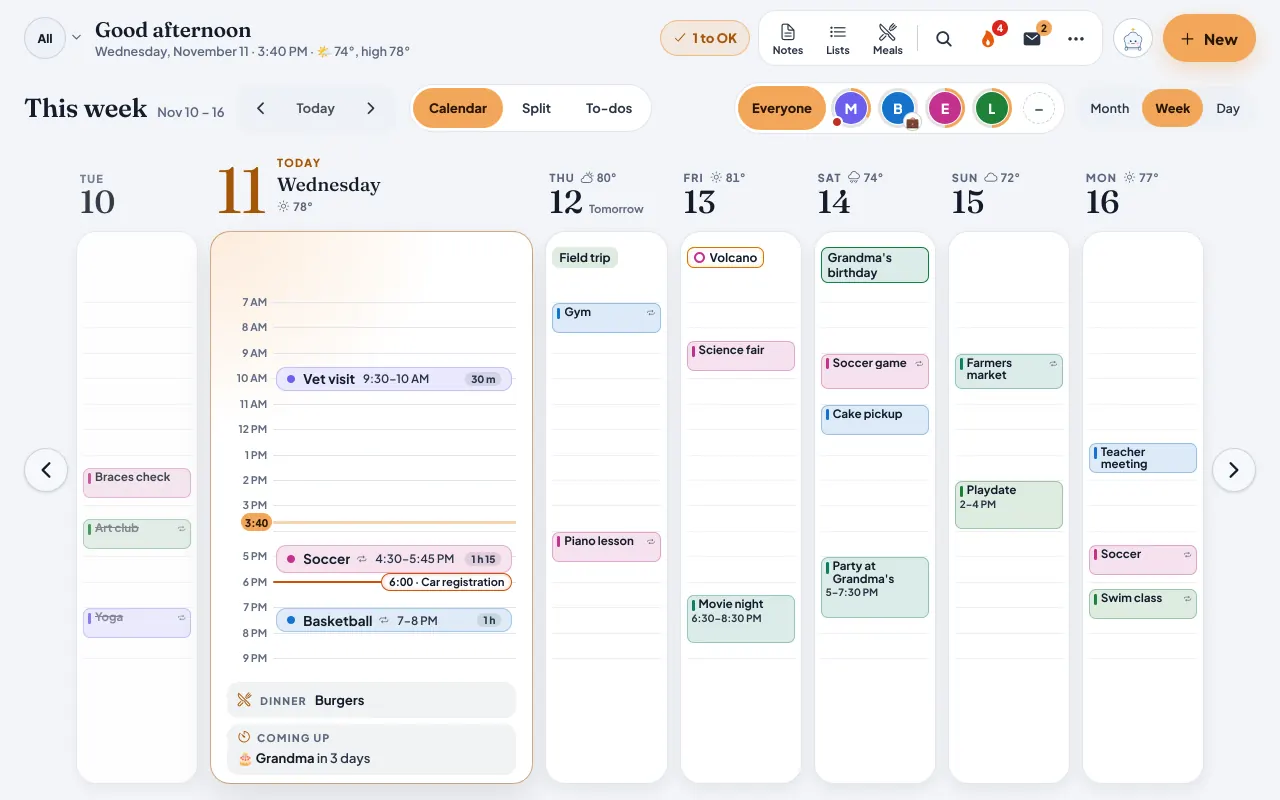
The calendar shows the day. Today is a big card with a timeline and a line for now, and every day of the week has its hours on one shared scale, in a color for each person. See how the calendar works.
Using both
You do not have to move anything at once. InVenn takes calendar links in, and Apple's public calendars have a link anyone can subscribe to, so a calendar you already keep can appear in InVenn's week. Google Calendar is the one InVenn syncs both ways. What InVenn asks of you: it installs from the browser rather than an app store for now, and a few features are still being finished. It has a free plan.
We are not affiliated with Apple. Apple, iPhone, iPad, Mac and iCloud are trademarks of Apple Inc., and product names belong to their owners. Spotted something out of date? Tell us and we will fix it.
Questions
Good to know
Does Apple Calendar have a family calendar?
Yes. If you are in a Family Sharing group, Apple says a Family calendar appears automatically for everyone in the group. You can also share any iCloud calendar with people, and choose whether they can edit it or only view it.
Can my family use InVenn if some of us have Android phones?
Yes. InVenn runs in the browser of a phone, tablet or computer, so one family can mix iPhones, Android phones and a Windows laptop. Apple's Calendar runs on Apple devices. On Windows it comes through iCloud for Windows with Outlook 2021 or later, and iCloud.com works in desktop browsers; Android is not a supported platform.
Can I use Apple Calendar and InVenn together?
Yes. InVenn takes calendar links in, and an Apple public calendar has a link anyone can subscribe to. Google Calendar is the one InVenn syncs both ways.
Does Apple Calendar have chores and rewards?
We found no chores or rewards feature in Apple's Calendar help pages. The Reminders app can share lists and assign tasks. InVenn adds stars, a rewards store and a parent's OK.
Is Apple Calendar free?
The Calendar, Reminders and Notes apps are free with an Apple device, iCloud includes 5 GB, and Family Sharing is free. Optional iCloud+ storage costs from $0.99 to $59.99 a month as of October 2026, and a plan can be shared with five family members.
Get the app
Get your family's code
Free, and no waiting. Type your name and email: your code appears right away, with step-by-step instructions for every phone, tablet and computer. We email them to you too.
One code per family. We use your email only to send your code and instructions. Privacy policy