
A shared family to-do list, with deadlines you can't miss
To-dos for everyone, with priorities, subtasks and reminders. And for the dates that can't move, a deadline: circled in red like a day on a paper calendar, and never allowed to slide quietly.
To-dos for everyone
One list, everyone's things
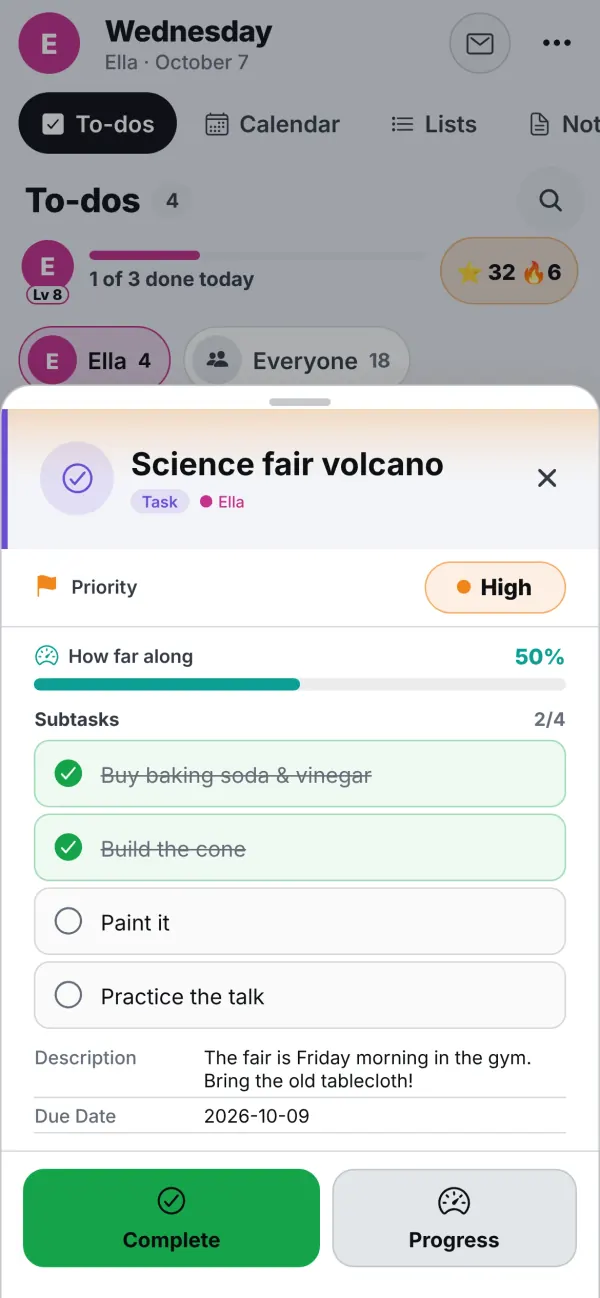
Each person has their own to-dos in their own colour, and the family has shared ones. Priorities show in colour, subtasks are ticked as you go, and the bar fills as the science fair volcano gets built. A reminder arrives on your phone even when the app is closed.
Asking turns into doing. When a kid writes "Can you sign my form?" in the family mailbox, a tap makes it a to-do. A to-do can have a picture for kids who can't read yet.
- Priorities in colour, subtasks, notes and pictures
- Reminders that arrive, even with the app closed
- Requests from the mailbox turn into to-dos
Deadlines
Some dates can't move. Now they look it.
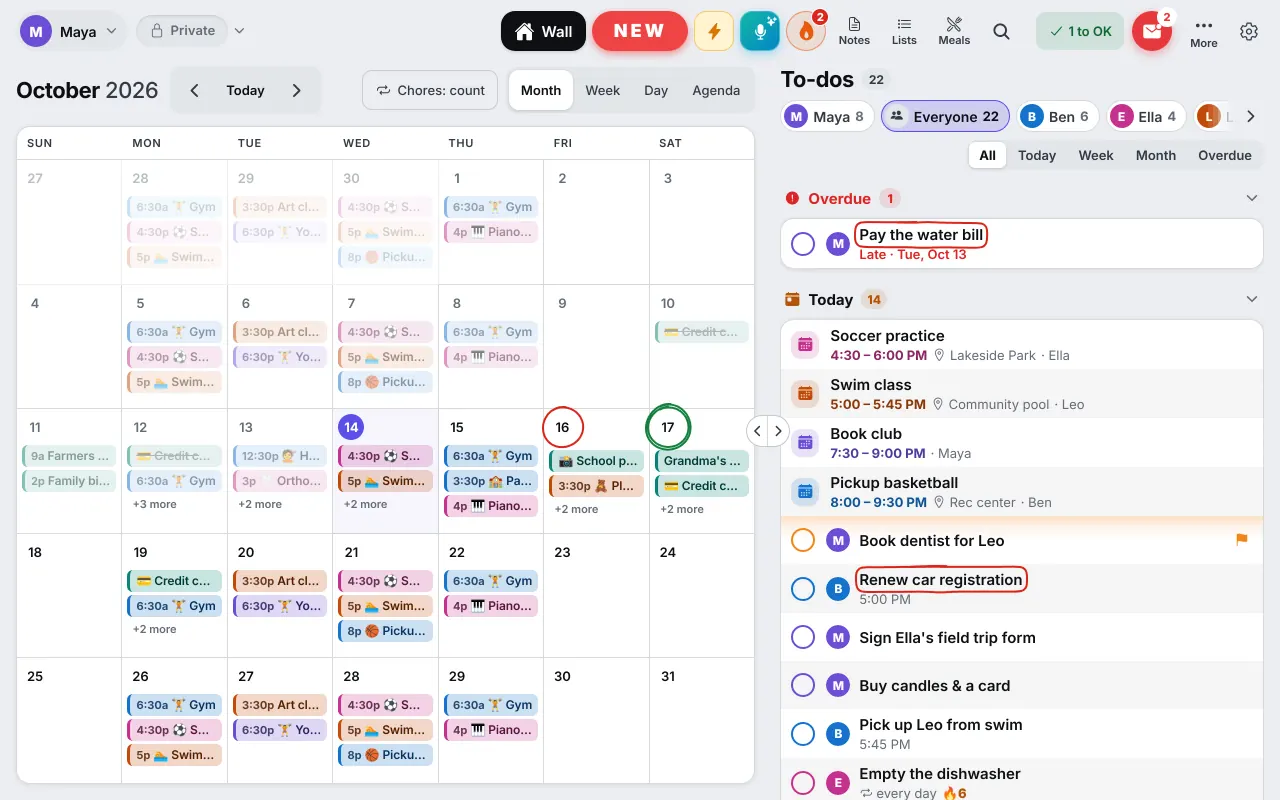
"Renew the passport by November 3." "The tax bill by Friday, 5 PM." Dates like these get lost among the soft ones. Switch Deadline on and the to-do gets a hand-drawn red circle everywhere it appears: on the day number in Month view, around the title in lists and on the Wall, around the time on long rows.
A deadline never slides quietly. If it passes, it stays red and visible until it is done or you turn the switch off. A date with no time is due at the end of that day. A done deadline keeps a faint circle with a tick for the rest of the day, then loses it.
- A red hand-drawn circle, not another colour to decode
- Birthdays get a green double loop on the calendar's day numbers
- No flames moving on the screen: the circle draws on once and is still
The 🔥 list: what is due next
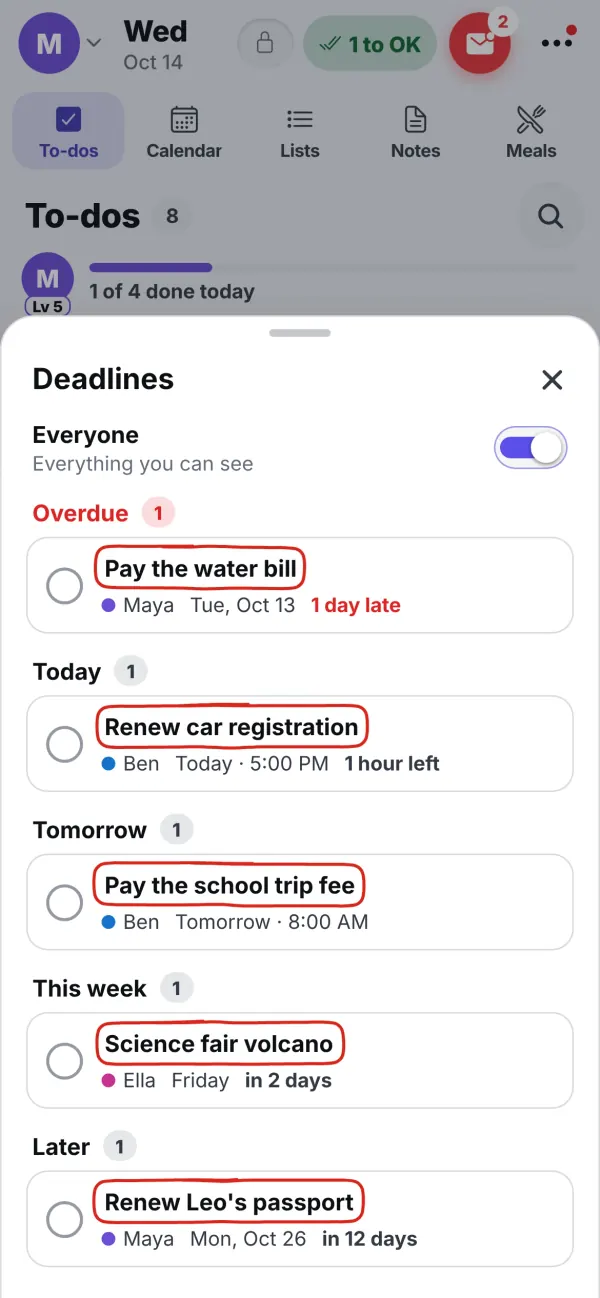
Next to the mic in the top bar sits a 🔥 button, with a small count (on a phone it is the Deadlines row in the ⋯ menu). It shows when a deadline is coming or overdue, and it is muted when only other people's deadlines are. Tap it for a list sorted by date and time: Overdue, Today, Tomorrow, This week, Later, with "in 2 days" or "2 hours left" beside each. On your own device it shows yours and the family's shared ones; an Everyone switch adds everyone else's that you're allowed to see. Tap one to open it, or tick it done right there.
Reminders are set for you: the evening before and the morning of, or an hour before when the deadline has a time. If you set your own reminders, yours win. Today's and overdue deadlines go to the top of the morning rundown, the one calm message a parent gets each morning.
Say it instead of typing it: "pay the tax bill by Friday" makes a deadline, and "on Friday" stays a soft date. You always check the card before anything is saved.
Kids have them too. A parent can set a deadline on a kid's homework, and it is circled in their own to-dos and on their card on the Wall. Private and Work deadlines follow the Private | Work rules, and the shared Wall shows only the family's.
Try it
Your first deadline in a minute
Open a to-do
Pick one with a date that really can't move, or add a new one with its date.
Switch Deadline on
Use the flame switch at the top right of the to-do. The screen gets a warm tint.
Watch the circle
Find it in Month view, the lists and the 🔥 list. Tick it done when it is.
Questions
Good to know
What is the difference between a deadline and a due date?
A due date is a soft wish: 'I'd like it done Tuesday', and it can slide. A deadline is a date that cannot move, like the tax bill or a passport renewal. You switch Deadline on for those, and InVenn circles them in red and keeps them visible until they are done.
Is a deadline the same as a priority?
No. Priority says how much something matters, and a deadline says the date can't move. A Medium to-do can have a hard deadline, so the two are separate.
Will I be reminded?
Yes. A deadline reminds you the evening before and the morning of, or an hour before if it has a time. If you set your own reminders, yours are used instead. Today's and overdue deadlines also lead the morning rundown.
Can I say a deadline out loud?
Yes. Say 'pay the tax bill by Friday' to the mic and it becomes a deadline, while 'on Friday' stays a soft date. You check the card before it is saved.
Do work deadlines show on the kitchen Wall?
No. The Wall shows only the family's deadlines. Private and Work deadlines show on their owner's devices, and Work ones in Work mode.
Get the app
Get your family's code
Free during the beta, and no waiting. Type your name and email: your code appears right away, with step-by-step instructions for every phone, tablet and computer. We email them to you too.
One code per family. We use your email only to send your code and instructions. Privacy policy